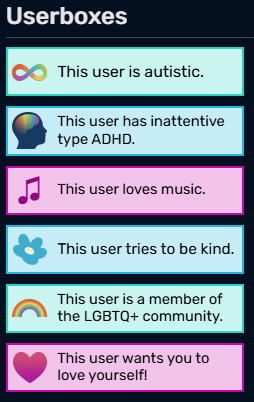
Userboxes from MissLunaRose's profile page
Userboxes are small colorful boxes that users can use to decorate their user pages. They allow for self-expression and let people share facts about themselves. Many wikis adopt these as part of their culture.
Here's an example of what a userbox looks like:
 |
This is a userbox. |
Usage
Userboxes were first introduced to go alongside the MediaWiki extension Babel. Users could use userboxes to specify which languages they knew and how proficient they were.[1][2]
Now, userboxes can communicate things like hobbies, skills, interests, fandoms, identity, and more. They can be serious or silly.[3] A set of userboxes can reveal a user's personality and sense of style.
Some userboxes are designed to be customizable, allowing the user to choose things like a background color or set of icons. This involves some template coding skills. For example, all of these are variations of one "User alignment" template:
|
|
|




Appearance
Typically, userboxes have a small icon, symbol, or word on the left. On the right is a sentence, which often begins with "This user..." and shares a personal fact. However, some userboxes have other layouts, such as putting the icon on the right instead of the left.
Some wikis, such as the Autism Living Wiki, adopt formal color themes so that the userboxes have a harmonious color palette.[4] Others have no specific color theme.
Userboxes on the Wiki Wiki
We have userboxes you can use to decorate your profile page on the wiki. A list of all current existing userboxes on the Wiki Wiki is in Category:List of userboxes.
We have 2 main userbox templates:
- Userbox, a general userbox
- UserboxThemed, which lets you easily select a color theme using colors from our homepage
There are two different ways to add userboxes to your profile page:
- Directly add the Userbox or UserboxThemed template to your user page. Then fill out the fields to your liking.
- Create a new page under the Template namespace. Use the Userbox or UserboxThemed code to create a new userbox. Then add this template to your page. By making an official new userbox, you allow other people to easily use it too.
You're also welcome to copy the userbox templates over to your own favorite wiki(s).
See also
- Category:Icons (for images you could put in your userboxes)
- Category:List of userboxes (for existing userboxes you can add to your profile page)
Sources
- ↑ Wikidata:Userboxes, WikiData
- ↑ Wikipedia:Userboxes, Wikipedia
- ↑ ThisUser.Net
- ↑ Template:Userbox, Autism Living Wiki